

Frappe Gantt
A modern, configurable, Gantt library for the web. Completely Open Source.


Install
npm install frappe-gantt
About
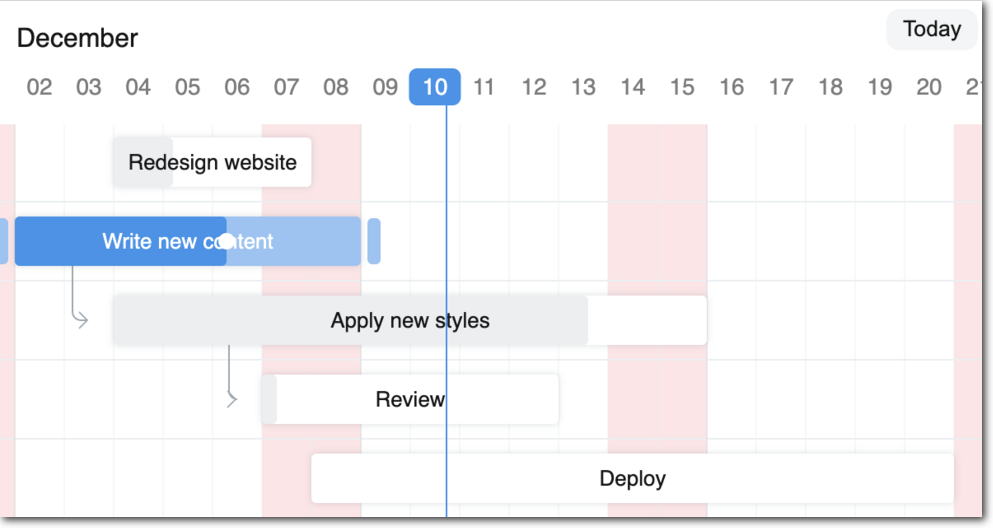
A Gantt chart is a bar chart that visually illustrates a project's schedule, tasks, and dependencies. With Frappe Gantt, you can easily build beautiful Gantt charts, with extensive levels of configurability.
You can use it anywhere from hobby projects to tracking the goals of your team at the worksplace.
ERPNext uses Frappe Gantt.
Motivation
We at Frappe built Gantt after realizing that although Gantt charts are everywhere, there was no open source implementation.
Today, we pride ourselves on having the most aesthetically pleasing and powerful Gantt library on the market - except it's free!
Key Features
- A wide variety of modes - be it day, hour, or year, you have it. Or add your own modes!
- Easily ignore time periods from your tasks' progress calculation
- An incredible amount of configurability: spacing, edit access, labels, you can control it all.
- Multi-lingual support
- Powerful API to integrate Frappe Gantt into your product.
Usage
Include it in your HTML:
<script src="frappe-gantt.umd.js"></script>
<link rel="stylesheet" href="frappe-gantt.css">
Or from the CDN:
<script src="https://cdn.jsdelivr.net/npm/frappe-gantt/dist/frappe-gantt.umd.js"></script>
<link rel="stylesheet" href="https://cdn.jsdelivr.net/npm/frappe-gantt/dist/frappe-gantt.css">
And start hacking:
let tasks = [
  {
    id: '1',
    name: 'Redesign website',
    start: '2016-12-28',
    end: '2016-12-31',
    progress: 20
  },
  ...
]
let gantt = new Gantt("#gantt", tasks);
To see the list of all options, check out the docs (under development).
Development Setup
If you want to contribute enhancements or fixes:
- Clone this repo.
cdinto project directorypnpm ipnpm run build- orpnpm run build-devto watch for changes!- Open
index.htmlin your browser - Make your code changes and test them.
License: MIT